


Cancelling, resuming and refunds
Cancel at the end of the paid period, change your mind before it ends, and how refunds work.
Cancel your subscription
- Open Settings → Billing and plans and select Cancel subscription. Confirm with your password if asked.
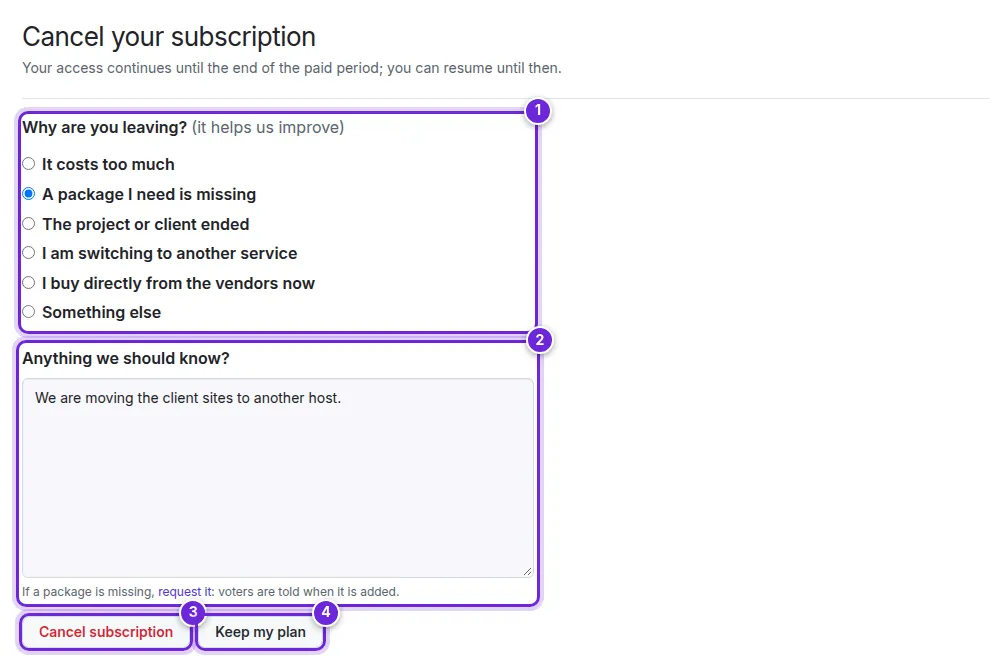
- Tell us Why are you leaving? (1) and, if you like, Anything we should know? (2). If a package is missing, request it: voters are told when it is added.
- Select Cancel subscription (3), or Keep my plan (4) if you changed your mind.
Sometimes the page offers a discount to stay; Stay with the discount applies it to your next invoices at once.
What happens next
- Your access continues until the end of the paid period; the plan shows Cancelled — active until the period ends and the date.
- After that date, Composer answers 403 to your tokens. Your account, tokens, stars and settings stay; subscribe again at any time.
Resume
Until the end of the period, Resume subscription on the billing page undoes the cancellation; nothing is charged until the next renewal.
Refunds
Refunds follow the terms of service. Write to support from your account with the invoice number; a refund reaches your card in 5–10 days, and you get a notice when it is issued.
Deleting your account ends the subscription immediately, without a refund for the current period (Changing your e-mail, language, or deleting your account).
Did this not answer your question? Contact support.